

Silver and Fame per Hour in Albion Online: How to Measure and Compare Your Farms
Silver per hour is what a farm earns you divided by the time you spend on it: the silver you pick up, plus what your loot and gathered resources are worth. Fame per hour is the same with fame. No farm has a fixed number. It depends on your gear, specs, zone, group, Premium and your server's market, so the reliable way to find your best farm is to measure your own play.
The free AFM Data Client does that while you play. It saves every outing as a session with its silver per hour and fame per hour, and keeps them so you can put one farm next to another. This guide explains what each number counts, how the time is measured, and how to compare farms fairly.
Start measuring
- Install the Data Client and start Albion Online. The Data Client tutorial covers Windows, Linux and macOS.
- Open the Activity page. Recording is on from the start.
- Leave town and play. A session starts by itself when you leave a city, Rest, portal town or hideout for the open world, a dungeon or the Mists. You can also press Start session.
- Current shows the session as it happens. History keeps every session afterwards.
Your sessions stay on your computer, and you don't need an AFM account to record them.
How the time is counted
A rate is only as good as the clock behind it. A session's time:
- starts when you arrive in a play area, or when you press Start session, so the ride to your first mob counts;
- keeps running in town between trips, so banking, repairing and selling count too;
- ends when you press End session, switch character or turn recording off;
- also ends after 30 minutes without moving or acting, and then it ends at your last movement, so time spent AFK doesn't count;
- pauses when you close the game or the client, and continues without the time away if you're back within 30 minutes.
Inside a session, each dungeon, Mists visit or stretch of open world is a run. Pick a run in History to see its numbers alone. They cover only the time in that place, without the trips in between. Use the session rate for what a sitting really earns, and run rates to compare one dungeon or zone with another.
What silver per hour counts
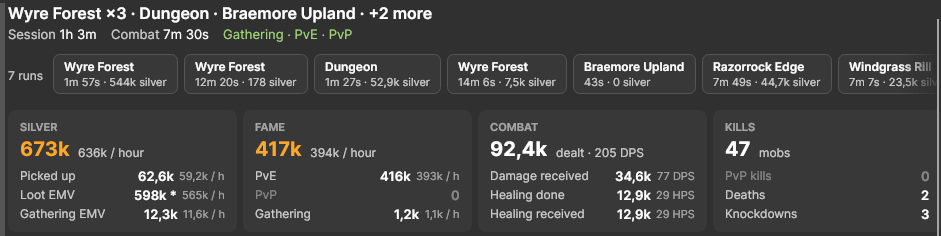
The Silver card adds up three things. Its big number is the total, the rate beside it is per hour, and each row has its own rate.
| Row | What it counts | How it is valued |
|---|---|---|
| Picked up | Silver you take from mobs and chests | The silver that reaches you, after the taxes and penalties the game deducts |
| Loot EMV | Items you pick up | Black Market EMV when there is one, otherwise EMV |
| Gathering EMV | Resources you gather and fish you catch | EMV; a journal you fill while gathering counts as a full journal minus an empty one |
EMV is AFM's estimated market value of the item on your server. When you are logged in, the Price Checker shows the Royal EMV and Black Market EMV of any item. Items without an EMV yet are left out of the total, and their row shows an asterisk. If you sign in to AFM in the client, it can look up values for items it hasn't priced yet.
The session in the picture lasted 1 hour 3 minutes: 673k silver, or 636k per hour. Most of it, 598k, is loot.
What fame per hour counts
The Fame card adds up PvE fame from mobs, PvP fame from killing players, and gathering fame, fishing included. Fame the client can't tie to one of those shows as Unknown and still counts in the total.
- Premium's 50% fame bonus is included. Compare sessions played with the same Premium status.
- Bonus fame from Quick Learn is left out, so the rate doesn't change when you turn Quick Learn on. The Learning Points guide explains Quick Learn.
- Combat fame goes to the Destiny Board nodes of the gear you wear. Divide the fame a node needs by your fame per hour to see how long it will take. At the 393k PvE fame per hour of the session above, a weapon combat specialization such as Broadsword Combat Specialist, which needs 33,910,220 fame from 0 to 100, takes about 86 hours. The fame to level 100 guide lists the fame for every node.
One drop can make the whole hour
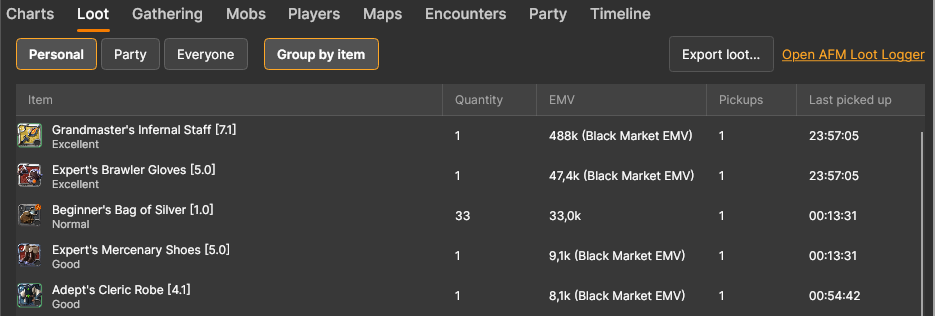
Open the Loot tab of a session in History and turn on Group by item to see what the Loot EMV is made of. In the session above, a single Grandmaster's Infernal Staff [7.1] is worth 488k at the Black Market, almost three quarters of the session's 673k. Without it, the session earned about 185k, roughly 175k per hour.
That is why one session says little about a farm:
- Judge a farm over several sessions. Ctrl-click or Shift-click sessions in History (Cmd-click on macOS) to combine them. Their totals add up, and the rate divides them by their added time, so one lucky drop weighs less.
- Look at the split. Silver picked up is already yours. Loot and Gathering EMV are what the items should sell for, and a farm that lives on rare drops swings far more than one that lives on silver and resources.
EMV is not silver in your pocket yet
The client counts what comes in, not what goes out, and it values items at their estimated price. Before you call a farm profitable, take off:
- The market's cut. Selling costs a 4% sales tax with Premium and 8% without, and a sell order adds a 2.5% setup fee. The selling guide covers orders, taxes and where to sell.
- The Black Market's terms. Loot valued at Black Market EMV fetches that price only at the Black Market in Caerleon, which buys through buy orders.
- Your costs. Repairs, food, potions and the gear you lose when you die are not subtracted. Loot you picked up stays in the total even if you lose it in a death later.
Silver you make by selling at the market isn't part of a session either. The Data Client keeps your market trades on its separate Trades page.
Compare farms fairly
- One activity per session. Press End session when you switch from, say, gathering to dungeons, so each session holds one kind of farm.
- Same setup. Use the same character, a similar set of gear and the same Premium status in the farms you compare.
- Enough time. Play each farm for at least an hour, or combine several sessions.
- Personal or Party. Personal shows your own numbers. Party adds the people in your party, which shows what a group run made in total.
- Costs. Take your repairs, consumables and deaths off the result before you compare.
Where to find each number:
| You want to know | Where to look |
|---|---|
| How the sitting you're playing is going | Current, with Session selected |
| How the dungeon or zone you're in is going | Current, with Current run selected |
| Your last few hours, across sessions | Current, with Last X hours (1 to 168 hours) |
| How a past outing went | History, then pick the session |
| One zone or dungeon of that outing | History, then pick a run |
| A farm over many outings | History, then Ctrl-click or Shift-click its sessions |
| Everything you looted and gathered today or this week | Items, with Time set to Today, Last 7 days or a custom range |
Which farm pays the most?
The one with the best numbers in your own sessions, after costs. The client records your play outside town: the open world (Roads of Avalon included), dungeons and static dungeons, the Mists, Hellgates, Corrupted Dungeons, the Abyssal Depths, expeditions and arenas, plus gathering and fishing. These guides help you pick what to try:
- Static dungeons and Roads of Avalon
- Hellgates and the Abyssal Depths
- Gathering and fishing
What you do in town doesn't start a session, so crafting, refining, flipping and island farming are measured with AFM's calculators instead: Profitable Crafts for profit per craft, the Market Flipper for flips and the Farming and Breeding Calculator for profit per day on your island. The beginner silver guide compares the main ways to make silver.
For fame, measure PvE fame per hour with the gear of the node you want to level in two or three kinds of content, and stay with the best. For crafting, refining, gathering and farming nodes, the Destiny Calculator counts how many crafts, resources or harvests a node needs.
Keep the numbers on screen
You don't have to open History to see how a farm is going:
- Current updates as you play, and its chart follows your combat, gathering and fame over the last 5, 10 or 15 minutes, so you see when your pace drops.
- Open streamer window opens a small window with the session's silver and fame per hour, which you can keep beside the game or capture in OBS.
Get the AFM Data Client · Data Client tutorial · Destiny Calculator