

How to Sell Items in Albion Online: Sell Orders, Buy Orders, Taxes and the Best City
To sell an item in Albion Online, open the Marketplace in a city and go to the Sell tab. You have two choices: Sell gives you the silver right away from the highest buy order and costs only the sales tax, 4% with Premium or 8% without. A Sell Order lists the item at your own price: you pay a 2.5% setup fee when you list it and the same sales tax when it sells.
Every city has its own Marketplace with its own prices, so the same item can pay much more in another city. This guide covers both ways to sell, what they cost, how buy orders work and how to find where your item sells best.
How to sell an item
- Go to the Marketplace of the city where your items are. Marketplaces are local: an item listed in Martlock can only be bought in Martlock.
- Open the Sell tab (Sell from Inventory). It lists what you carry. Items must be at 100% durability, so repair damaged gear first.
- Pick Sell or Sell Order. The Sell button sells the item at once to the best buy order. Sell Order, in the item's action menu, lists it at the price you choose.
- Check the prices the game shows you. The window shows the best matchable price (the highest buy order and how many it wants) and the lowest competing price (the cheapest sell order and how many are for sale). A sell order also shows the setup fee and taxes before you confirm.
To empty a bag of loot quickly, use Quick Sell: select the items, check the estimated value and click Sell Selected. It sells to the current buy orders, and the game warns that the value it shows is not guaranteed, since prices can change.
Sell or sell order: what each costs
| Sell now (to a buy order) | Sell order | |
|---|---|---|
| Setup fee, paid when you list | None | 2.5% |
| Sales tax with Premium | 4% | 4% |
| Sales tax without Premium | 8% | 8% |
| Total with Premium | 4% | 6.5% |
| Total without Premium | 8% | 10.5% |
Rates from the game's Marketplace data. Premium halves the sales tax.
Example: the best buy order for your item is 10,000 silver, and you could list a sell order at 11,000.
| With Premium | Without Premium | |
|---|---|---|
| Sell now at 10,000 | 9,600 | 9,200 |
| Sell order at 11,000, once it sells | 10,285 | 9,845 |
The sell order pays more only if it sells. As a rule of thumb, a sell order is worth it when your price is at least 3% above the best buy order: with Premium, a sell order 2.7% above the buy order gives the same silver as selling now; without Premium, 2.8%. Below that gap, the setup fee eats the difference.
- Sell now when you need the silver, when buy and sell orders are close, when the item sells slowly, or when you will not be back in that city.
- Use a sell order when the gap is larger and the item sells often enough that yours will be bought before it expires.
The silver from a sell order reaches you as each piece sells, so you do not need to go back to collect it.
How buy orders work
A buy order is the other side of the market: you set the price you are willing to pay and wait for someone to sell to you. Players who pick Sell fill buy orders, starting with the highest.
To create one, open Create Buy Order and choose:
- Min. Quality: the lowest quality you accept.
- Quantity and price per item.
- Duration: 12 hours, 1 day, 7 days or 30 days.
You pay the full total up front, plus the 2.5% setup fee. Sellers then fill your order at your price, and the items you bought wait in the Completed Transactions tab of that Marketplace. If the order expires or you cancel it, the silver for the items not bought is refunded.
Buy orders are how crafters and traders buy below the sell order price. To see who is buying an item before you sell, open Other Players' Buy Orders.
Managing your orders
- Your Active Orders lists your buy and sell orders. You can edit an order's price only while nothing from it has sold or been filled.
- Orders end on their own. An order runs until it is complete or its duration ends, at most 30 days, and is then canceled.
- Completed Transactions holds the items you bought and the unsold items from canceled or expired sell orders. Claim them within 60 days, or they are deleted.
- Items stay where you listed them. You can cancel an order from another city, but you have to travel back to the city of the order to pick up the items.
- Watch the price warnings. When your price is below the market average, the game warns you. The Apply Market Average button fills in the average for you.
Where to sell: finding the best city
Each of the Royal Cities, Caerleon and Brecilien has its own Marketplace, with its own supply and prices. Before you sell anything valuable, compare cities.
Resources
The game's own tip is that resources used where a city has a production bonus are in greater demand there. Each raw resource has one city with a refining bonus, where refiners get more back:
| Raw resource | Refined into | City with the refining bonus |
|---|---|---|
| Hide | Leather | Martlock |
| Ore | Metal Bar | Thetford |
| Fiber | Cloth | Lymhurst |
| Wood | Planks | Fort Sterling |
| Stone | Stone Block | Bridgewatch |
This is a hint, not a rule. Prices change every day, so check them before you haul a load across the map. The city bonuses guide lists every refining and crafting bonus.
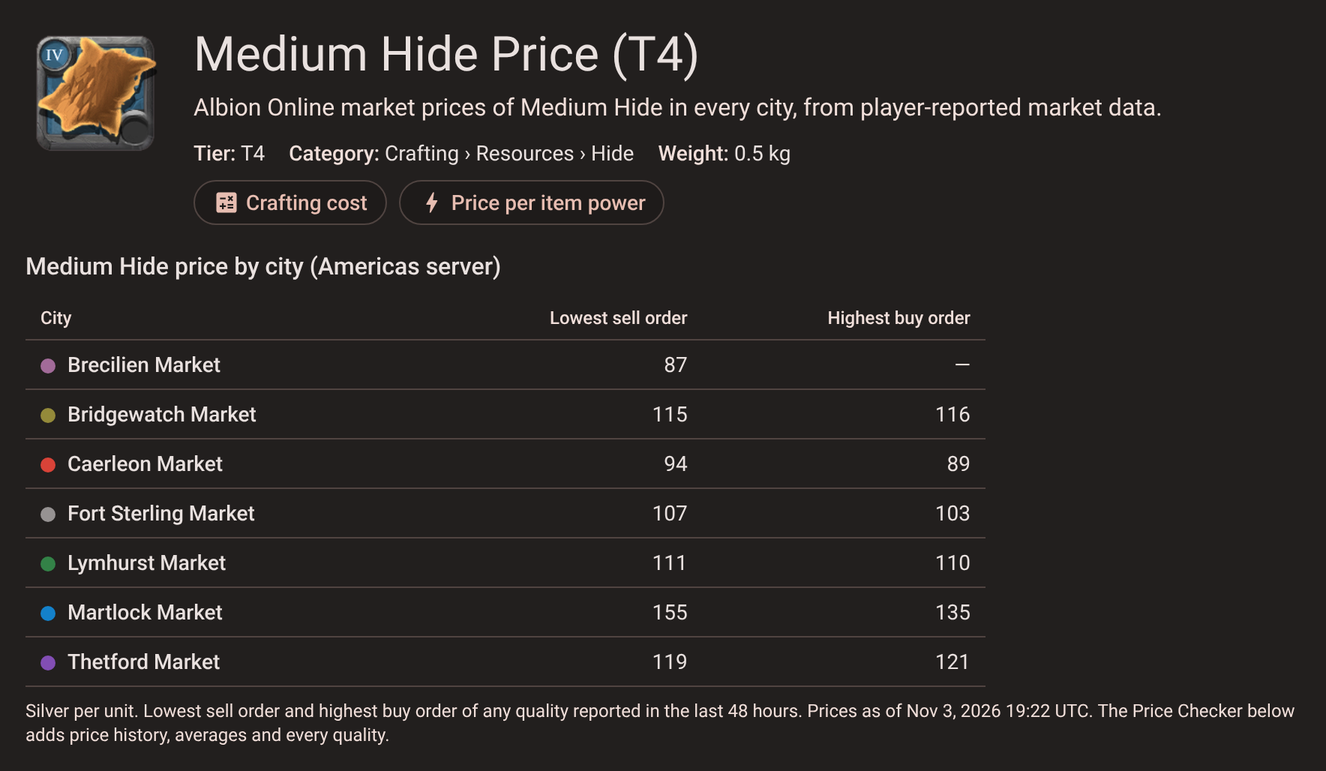
Every item has a price page like this in the Price Checker. The highest buy order column is what you get selling now, and the lowest sell order column is the price you compete with when you list a sell order.
Gear and the Black Market
The Black Market in Caerleon buys gear from players and uses it as the loot that creatures drop all over the world. It pays more for items it is short of. It buys:
- Weapons, off-hands, armor, helmets, shoes, capes and bags
- The five gathering tools: Axe, Pickaxe, Sickle, Skinning Knife and Stone Hammer
It does not buy resources, food, potions, mounts or artifacts. Every item's page in the Price Checker shows whether it is eligible. You sell to Black Market buy orders the same way as in any city. Buying gear in a city and selling it to the Black Market is the classic flip, explained in the Black Market Flipper tutorial. To craft for it, see the Black Market crafting guide.
Caerleon is surrounded by red zones, so carrying valuable items there is a risk. The Transporting Guide covers mounts and safer routes.
Luxury goods
Luxury goods are found in chests all over Albion, and each set always sells for a fixed price in one city. They often trade for less in other cities, so carry them to the right one.
| City | Luxury goods (1,000 / 5,000 / 25,000 silver) |
|---|---|
| Lymhurst | Silver Cup, Silver Mirror, Silver Candelabrum |
| Bridgewatch | Feather Talisman, Dreamcatcher, Holy Fetish |
| Martlock | Corrupted Scroll, Thin Booklet, Ancient Tome |
| Thetford | Ornamental Scepter, Globus Cruciger, Golden Crown |
| Fort Sterling | Simple Stone Toy, Stone Mask, Stone Idol |
| Caerleon | Ritual Candles, Blood Chalice, Sacrificial Dagger |
The Avalonian set sells in any Royal City: Golden Frame for 10,000, Golden Gyroscope for 50,000 and Golden Sextant for 250,000 silver. Prices from the items' own descriptions in the game.
The Smuggler's Network
The Marketplaces in the Smuggler's Dens of the Outlands form one network: every order is visible from every den. Setting up an order there costs 1.5% instead of 2.5%, but buying or selling across the network adds a distance fee of 4% of the price for each region between the dens. The Smuggler's Dens tutorial explains the network.
Check prices and what sells with AFM
The Price Checker compares any item across cities and qualities. Pick Buy Order, Sell Order and Averages, then hover a city to see its prices, how old they are and how many sold per day.
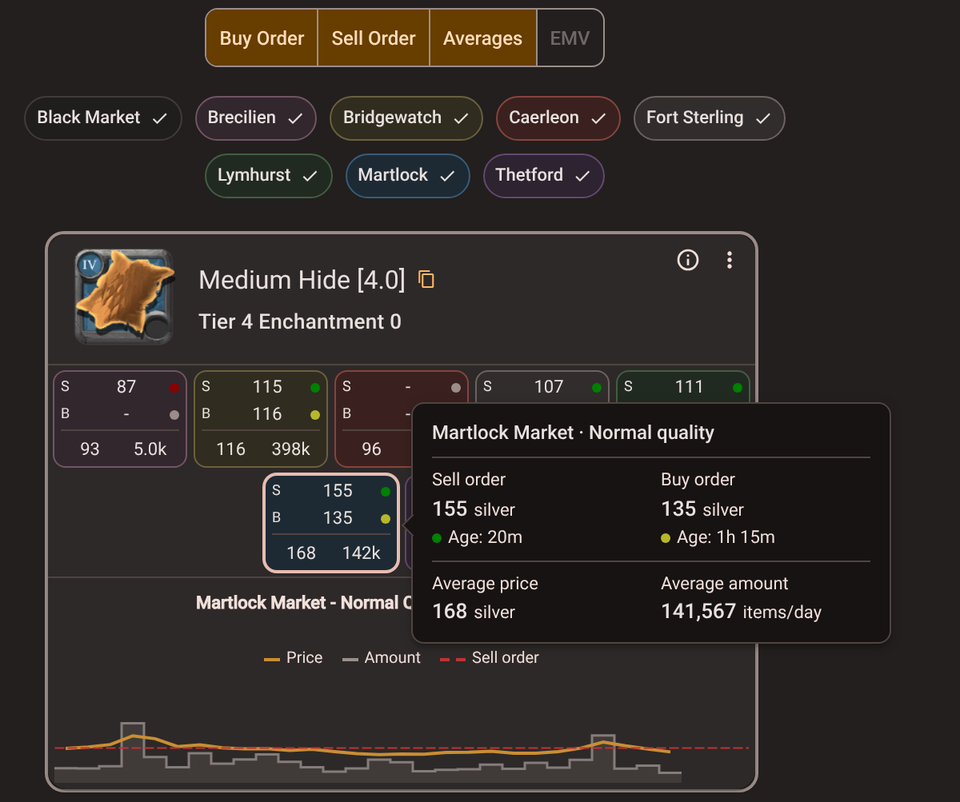
- Look at the age. Prices are reported by players who run a market data client such as the AFM Data Client while they play, so a price from yesterday may already be gone.
- Look at the amount per day. An item that sells 20 a day will not take 500 at your price. Click a city to open its price history.
- Compare every quality. Each quality has its own orders and prices; a Masterpiece and a Normal item are different markets.
Two more tools help you decide what to sell:
- Top Traded Items ranks the 100 items that move the most silver or the most units in a market, so you can see what sells fast. It needs a free Google login.
- The Portfolio Tracker logs your buys and sells, applies the setup fee and sales tax for your Premium status, and shows your real profit per item. It is a Masterpiece tool.
Quick tips
- Get Premium if you sell a lot. It cuts the sales tax from 8% to 4%. The Premium guide covers its price and its other benefits.
- Price just below the lowest sell order when you want a sell order to go fast, but not so far below that selling now would pay the same.
- Do not list more than sells. Match your quantity to the amount sold per day.
- Count the trip. A higher price in another city is worth it only if it covers the time and the risk of carrying the items there. Trade Routes ranks city-to-city trades by profit, including profit per kilogram.
Price Checker · Top Traded Items · Portfolio Tracker · Trade Routes