Albion Free Market
Discord Link

AFM SHEET KIT FOR GOOGLE SHEETS

Albion Online Crafting Spreadsheet

A ready-made Google Sheets spreadsheet with live Albion Online market prices, EMV, recipes and your specs. The crafting, refining and price check tabs work out your profit, and AFM formulas let you build sheets of your own.

Making a copy is free. Loading data into it needs a sheet key, which comes with Masterpiece Support.

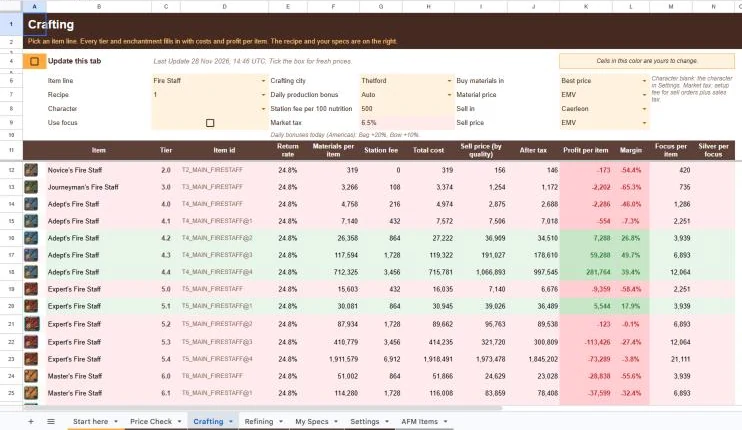
The Crafting tab of the AFM Sheet Kit in Google Sheets: Fire Staff crafts with profit in green and losses in red

INSIDE THE SPREADSHEET

Crafting, refining and market prices in one Google Sheet

Every tab reads AFM data through simple formulas. Change an input and the whole table follows.

CRAFTING TAB

Crafting profit for every tier and enchantment

Pick an item line, such as Fire Staff, and every tier and enchantment fills in.

  • Return rate with the city bonus, focus and today's daily production bonus
  • Material cost after returns, station fee and market tax
  • Profit and margin per item: green rows make silver, red rows lose it
  • The recipe, your specs and your focus cost beside the table
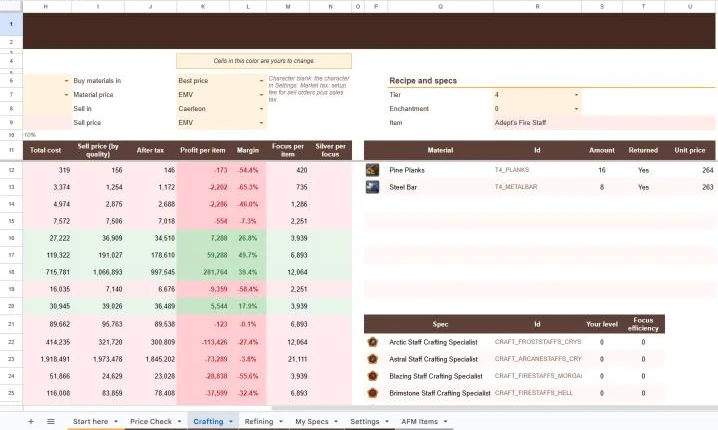
Crafting tab scrolled to the right: profit and margin of each Fire Staff craft next to the recipe and your crafting specs

REFINING TAB

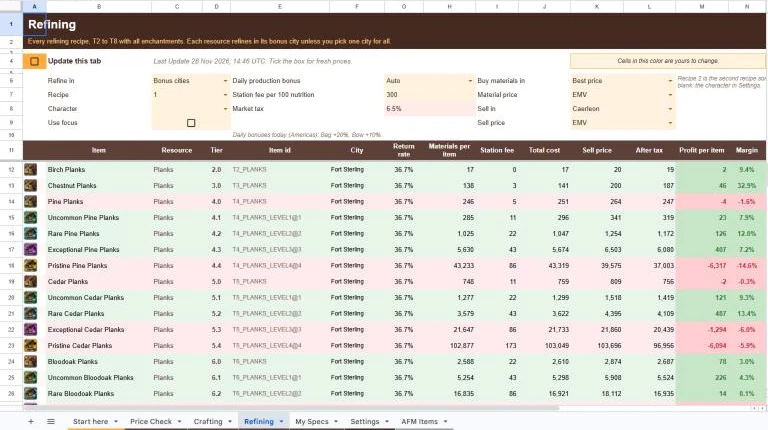
Refining profit for all five resources

Every refining recipe is already in place, from T2 to T8 with all enchantments.

  • Planks, metal bars, cloth, leather and stone blocks
  • Each resource refined in its bonus city, or one city for all
  • Materials bought where they are cheapest, products sold where you choose
  • Silver per focus when you refine with focus
Refining tab with planks refined in Fort Sterling, profitable rows in green and losing rows in red

PRICE CHECK TAB

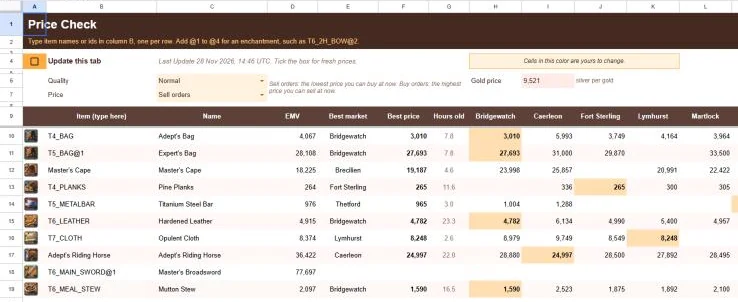
A market price table for any items

Type item names or ids, one per row, and see their prices across the markets you trade in.

  • Sell orders, buy orders or EMV for every Royal city, Brecilien, the Black Market and the Rests
  • The best market for each item and how many hours old its price is
  • Item pictures, names and enchantments with @1 to @4
  • The gold price on the same tab
Price Check tab listing bags, capes and resources with their EMV, best market and price in each city

More in the spreadsheet

The tabs are a starting point. The same data is there for any table you want to build.

Your specs and focus

Specs uploaded by the AFM Data Client set your focus cost and the chance of each quality, as on the website.

Your private prices

Prices you scan in private mode with the AFM Data Client are merged with the Albion Online Data Project prices.

Daily production bonus

Set the bonus to Auto and the sheet uses today's bonuses on your server, such as Bag +20%.

Price history and gold

Daily average prices and items sold, daily EMV and the gold price, ready for charts.

Every item in your language

Item ids, names and item lines, with names in any of the 14 game languages.

One Update per tab

Tick Update on a tab and the sheet fetches everything it needs at once. Formulas keep that data until your next Update.

SETUP

How to get the spreadsheet

The same steps are on the Start here tab inside the sheet, with every function and fixes for common problems.

  1. Make your copy

    Click Get a Copy of the Spreadsheet and confirm Make a copy. The copy is yours and lives in your Google Drive.

  2. Create your sheet key

    On albionfreemarket.com, open Account and create your key in the Google Sheets section. One key per account.

  3. Connect the sheet

    In your copy, open the AFM menu next to Help and choose Connect account, then paste the key. The first time, Google asks you to allow the kit to use the spreadsheet and fetch market data.

  4. Pick your server and markets

    On the Settings tab, choose Americas, Asia or Europe, the language of item names and the markets you trade in.

  5. Update a tab

    Tick Update this tab at the top of any tab. It loads every item the tab needs, usually in a few seconds. If item pictures show #REF!, click Allow access in the yellow bar.

Spreadsheet formulas

AFM functions work like any Google Sheets formula. Arguments can be ranges: one formula over a column of items is much faster than one formula per row.

The most used AFM functions. The Start here tab in the sheet lists all of them.
FunctionWhat it givesExample
AFM_PRICECurrent price in a market: lowest sell order, highest buy order or EMV. A row of markets gives one column per market.=AFM_PRICE(B10:B20, "Caerleon")
AFM_BEST_MARKETThe market with the best price: the cheapest sell order, or the highest buy order.=AFM_BEST_MARKET(B10:B20)
AFM_EMVAFM Estimated Market Value, the daily value worked out from real trades.=AFM_EMV("T6_BAG", 2)
AFM_HISTORYDaily average price and items sold, oldest first.=AFM_HISTORY("T4_BAG", "Caerleon", 1, 30)
AFM_GOLDThe gold price in silver, or the price of each hour for the last hours.=AFM_GOLD(24)
AFM_NAMEItem name in the language of the Settings tab.=AFM_NAME("T4_BAG@1")
AFM_LINEEvery tier and enchantment of an item line, such as every Fire Staff.=AFM_LINE("Fire Staff", 4, 8)
AFM_RECIPEThe materials of a recipe and whether the return rate gives them back.=AFM_RECIPE("T5_BAG")
AFM_RRRResource return rate, with the city bonus, focus and the daily bonus.=AFM_RRR("T4_PLANKS", "Fort Sterling", TRUE, "Auto")
AFM_RECIPE_COSTCost of the materials of one item after returns.=AFM_RECIPE_COST("T5_BAG", "Martlock", "emv", 0.248)
AFM_FOCUSFocus per item made, with your specs.=AFM_FOCUS("T6_MAIN_FIRESTAFF")
AFM_DAILY_BONUSESToday's daily production bonuses on your server.=AFM_DAILY_BONUSES()

Questions about the spreadsheet

Is the spreadsheet free?
Making a copy is free. The data comes through a sheet key, which is part of Masterpiece Support. Without an active subscription the sheet keeps the data of its last Update.
Which servers does it support?
Americas, Asia and Europe. Pick the server on the Settings tab: prices, gold and daily bonuses follow it.
Do the prices update by themselves?
No. Formulas show the data of the last Update, so numbers never change while you work. Tick Update this tab when you want fresh prices.
Where do the prices come from?
From the Albion Online Data Project, the same prices the website shows, merged with your private prices from the AFM Data Client. A price is only as fresh as the last player who opened that market.
Does it work in Excel?
No. The kit runs in Google Sheets, which is free with a Google account. A copy downloaded as an Excel file keeps its numbers but no longer updates.
Can I add my own tabs?
Yes. Add tabs to your copy and use the AFM functions there; Update on that tab loads what its formulas need. Cells copied into another spreadsheet lose the functions, so build inside your copy.
Is the spreadsheet in my language?
The tabs are in English. Item names follow the language you pick on the Settings tab, in any of the 14 languages of the game.
Google says the app is not verified. What do I do?
The script runs inside your own copy and only connects to Albion Free Market and the Albion Online Data Project. Click Advanced, then Go to AFM Sheet Kit.

© 2023-2026 Albion Free Market

Albion Free Market is not affiliated with Albion Online or Sandbox Interactive GmbH

All Albion Online Assets are property of Sandbox Interactive GmbH.