

AFM Bot: Bandit Assault and Daily Bonus Alerts for Your Albion Online Discord
AFM Bot is the free Discord bot of Albion Free Market. It posts an alert in your server when a Bandit Assault is announced, and a picture of the day's crafting bonuses and events after every daily reset. Members choose for themselves whether they get pinged. Anyone in the server can also check market prices and see Bandit Assault and daily bonus stats without leaving Discord.
This guide shows how to add the bot to your server, set up the alerts and use every command. It works for the Americas, Asia and Europe servers, and it speaks 14 languages.
What AFM Bot does
- Bandit Assault alerts: when a Bandit Assault is announced, the bot posts in your Bandit channel and pings the members who asked for it. The same message is updated when the assault starts, escalates and ends. Times are shown in each reader's own time zone.
- Daily bonus alerts: after each daily reset, the bot posts a picture of today's Daily Production Bonuses, the current and next events, and the seasonal event. When the bonuses or events change, the post is updated or a new one is posted.
- Opt-in pings: each alert channel has its own role, such as Bandit - Europe. Members add or remove it with the Manage subscription button, so nobody is pinged without asking.
- Commands for everyone: item prices with EMV, the last Bandit Assaults, and Bandit Assault and daily bonus stats.
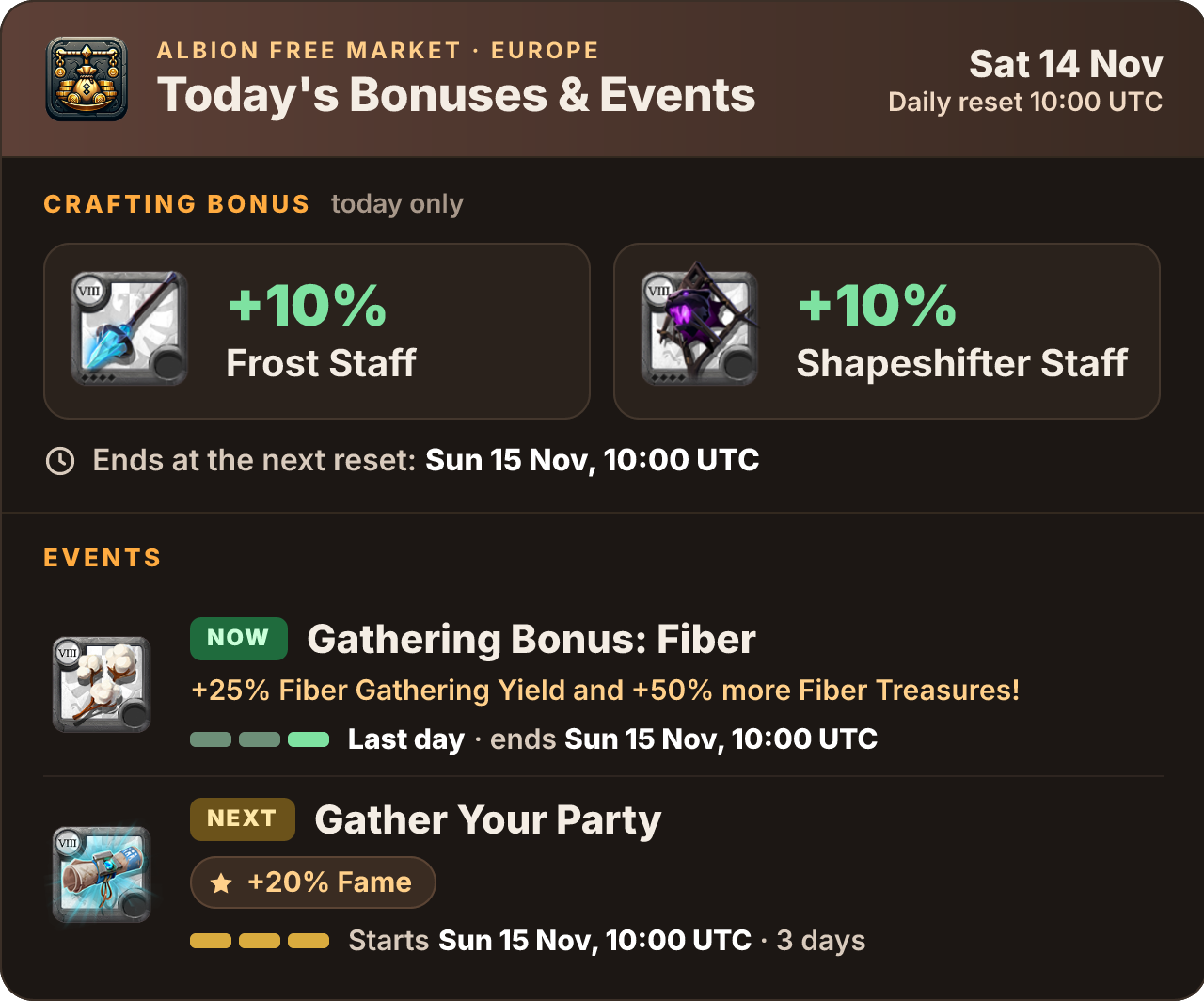
Bandit Assaults and the daily crafting bonuses are reported by players running the AFM Data Client and other Albion Data Project clients. Right after the reset, the picture can show the events first and the crafting bonus a little later, once one of those players logs in.
Add AFM Bot to your server
You need Discord's Manage Server permission in the server you add the bot to.
- In the Albion Free Market Discord, or any server that already has AFM Bot, type
/afm-bot-invite. Only you see the answer. - Press Add AFM Bot and pick your server.
- Keep every permission checked and press Authorize.
You can also open AFM Bot's profile in a server that has it and press Add App.
The permissions it asks for
| Permission | What AFM Bot uses it for |
|---|---|
| Manage Channels | Creates the alert channels during setup, hides a channel when you turn its alerts off, and deletes only what it created when you remove alerts. |
| Manage Roles | Creates the alert roles and gives or removes them when a member presses Manage subscription. |
| View Channels, Send Messages, Embed Links, Read Message History | Posts the alerts and updates them. |
| Attach Files | Posts the daily bonus picture and the stats pictures. Without it, the bot posts text instead. |
| Mention Everyone | Pings the alert roles while members still can't ping those roles themselves. The bot never pings @everyone or @here. |
Set up the alerts
Type /afm-notifications setup in your server. Only members with Manage Server can use it.
- Pick every Albion server your members play on: Americas, Asia or Europe.
- Pick the alert types: Bandit Hour event alerts, Bonus and festivity alerts, or both.
- Read the list of channels and roles the bot will create, then press Apply setup. Nothing changes before this step.
For each Albion server and alert type, setup creates a channel in an AFM Notifications category and a role to ping. For Europe:
| Alerts | Channel | Role |
|---|---|---|
| Bandit Assault | #bandit-europe | Bandit - Europe |
| Daily bonus and events | #bonus-europe | Bonus - Europe |
Americas and Asia get the same channels and roles with their own name. Members can read the alert channels but not write in them. Who can see them follows your server's own rules, so if new members only see channels after they verify, the alert channels stay hidden from them too.
Each new channel starts with a message that has a Manage subscription button. Members press it to subscribe to that channel's pings or to stop them.
If your server already has a channel and role with exactly these names in an AFM Notifications category, setup uses them instead of making new ones. To send alerts to a different channel or ping a role you already have, use /afm-notifications manage after setup.
Change, pause or remove alerts
/afm-notifications manage opens a panel for one Albion server, or for one alert type of that server:
- Disable stops the alerts. A channel the bot created is hidden from members, and everyone keeps their role and subscription. Enable brings it back.
- Change destination sends the alerts to another channel, or pings an existing role. The role must not give any permissions, so a subscription button can never give someone moderator powers.
- Repost signup posts the Manage subscription message again.
- Remove deletes the channels and roles the bot created, after you confirm. Channels and roles you made yourself are kept.
/afm-notifications status shows all six alert types (Bandit Assault and daily bonus for each of the three Albion servers) and any problem: a missing permission, a deleted channel or role, or a channel where the daily bonus picture can't be posted.
Commands
| Command | What it shows | Who sees the answer |
|---|---|---|
/afm-prices |
Prices and EMV of an item in every market, or in one market | Only you |
/afm-bandit-last |
The last 3 Bandit Assaults on a server | The whole channel |
/afm-bandit-stats |
Bandit Assault stats for the last 7 days and the last 90 days | The whole channel |
/afm-bonus-stats |
Daily crafting bonuses of the last 7 days and stats for the last 90 days | The whole channel |
/afm-settings |
Your Albion server and the language the bot answers you in | Only you |
/afm-help |
Every command | Only you |
/afm-bot-invite |
The button to add AFM Bot to a server, and this guide | Only you |
/afm-dataclient, /afm-npcap, /afm-encrypted, /afm-flipperbasics |
Download link and fixes for the AFM Data Client, and Flipper basics | Only you, unless you pick share |
Server managers with Manage Server also have:
| Command | What it does |
|---|---|
/afm-notifications setup, manage, status |
Set up, change and check the alerts |
/afm-server-settings |
The default Albion server for this Discord server, and the language of its alerts |
The price, Bandit and stats commands use the Albion server you saved with /afm-settings. If you haven't saved one, they use the server your managers picked with /afm-server-settings, then the server of your Discord's alerts, and otherwise Europe. Each of them also has a server option to check another server once.
Bandit Assault stats
/afm-bandit-stats posts a picture of the Bandit Assaults on your server:
- Last 7 days: how many assaults started on each UTC day, the average time between two assaults, and the shortest and longest gap.
- Last 90 days: how many assaults there were, how many per day, the average gap, and the UTC hours when they start most often.
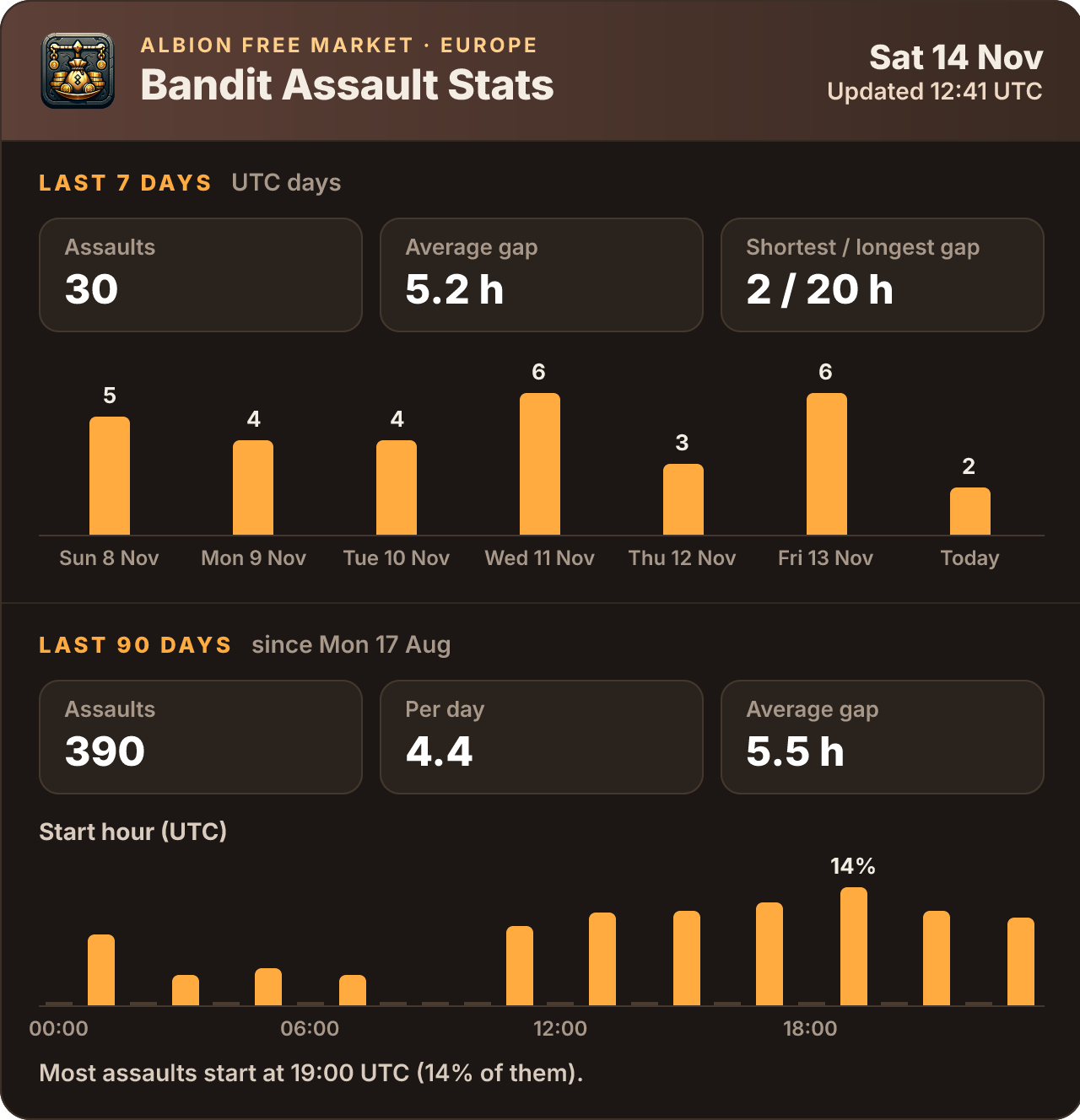
The text under the picture says when the last assault started, in your own time zone. For the daily time windows in which a Bandit Assault can start and the chance of each one, read the Bandit Assault times guide.
Daily bonus stats
/afm-bonus-stats posts a picture of the daily crafting bonuses on your server:
- Last 7 days: the two bonuses of each game day, and whether each one was 10% or 20%.
- Last 90 days: how many 20% bonuses there were, which categories came up most, and which have waited longest.
- Activity and seasonal events: the events of the last 7 days, such as Hellgate or gathering bonuses, and the ones that ran most often.
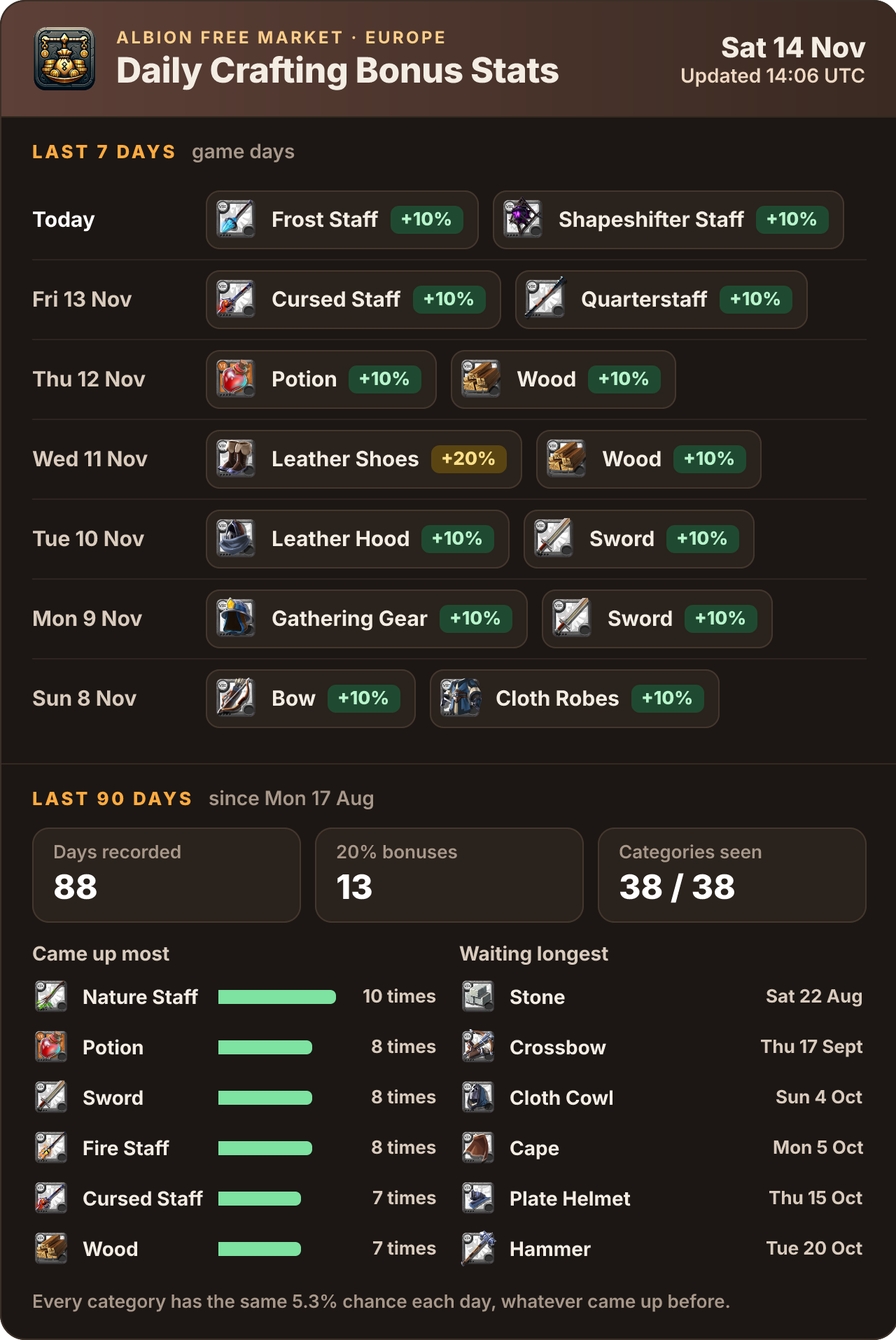
Every category has the same chance each day, about 5.3%, whatever came up before. A category that has waited a long time is not more likely to come up tomorrow. The Daily Production Bonus guide explains the odds.
Languages
AFM Bot speaks English, Português (Brasil), Deutsch, Français, Русский, Polski, Español, Italiano, 简体中文, 繁體中文, 한국어, 日本語, Bahasa Indonesia and Türkçe. Item and category names use the game's own names in each language.
- Answers to you use the language you pick with
/afm-settings, or your Discord language. - Alerts and subscription messages use the language picked with
/afm-server-settings, or your server's language in Discord. Changing it also updates the existing Manage subscription messages. - Command names stay in English, but their descriptions in Discord's command list are translated.
Troubleshooting
- The daily bonus alert is text instead of a picture: the bot can't attach files in that channel. Give the AFM Bot role Attach Files in Server Settings, Roles, or in the channel's permissions.
/afm-notifications statuswarns about this. - Pressing Manage subscription fails: in Server Settings, Roles, drag the AFM Bot role above the alert roles, and check that it still has Manage Roles.
- Alerts are posted but nobody is pinged: give AFM Bot Mention Everyone in that channel, or make the alert role mentionable.
- An alert was turned off on its own: when a channel or role is deleted, or the bot loses a permission it needs, the bot turns off only that alert and sends the server owner a direct message. Fix the problem, then turn the alert back on with
/afm-notifications manage. - Setup says a permission is missing: give the AFM Bot role the permission it names, or add the bot again with
/afm-bot-inviteand keep every permission checked.